 The Mill
Get The Mill
- Web
- Windows
- macOS
- Linux
Downloads are v1.5.5, released 2026-08-07. SHA-256 checksums. The Mill is free and MIT licensed.
What's new in v1.5.5
- A Word Blend session now counts in full toward the next character, so a session that met the bar actually moves you forward.
- Show Progress opens a summary of where you stand: what you have mastered, the character you are working on with its score and the score it needs, and which character comes next.
- Lessons are offered only once you have earned them, so the path through the alphabet stays in order. Re-drilling an earlier lesson still works, and Drill still gives you the full character set at any speed.
- A new User Guide, opened from the About dialog: what The Mill does, how each mode works, what the two speeds mean, and how to carry your progress to another machine.
Earlier releases are listed in the app, under About.
What it does
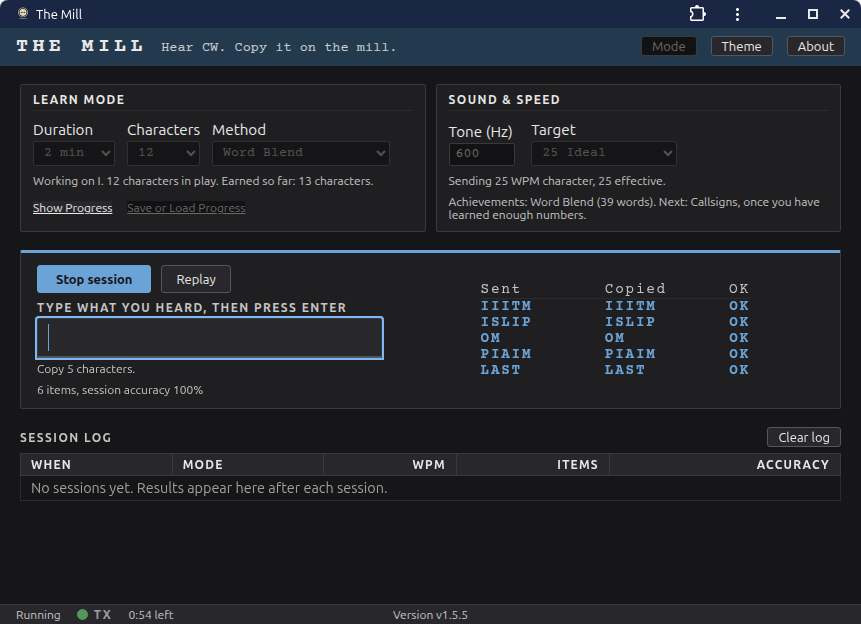
- Learn Mode teaches the characters by sound at full speed, leaning on the ones you miss and unlocking new sending methods as you earn them.
- Drills with random code groups, real callsigns, or words, all from embedded datasets.
- A contest simulator with realistic exchanges, including CQ WPX and DX-style contests.
- Farnsworth timing: set character speed and effective speed independently.
- Accuracy scored per session, character by character, so you can watch your copy improve.
- Works with the JAWS screen reader and is fully keyboard operable. Accessibility is a design requirement, not an afterthought.
The apps you download open in their own window using Google Chrome or Microsoft Edge, so one of the two must be installed.
Installing
Windows
Unzip the download and run mill-windows-amd64-v1.5.5.exe. There is no installer. Windows SmartScreen may warn the first time because the app is not code-signed: choose More info, then Run anyway.
macOS
Open the tar.gz and drag The Mill.app to Applications. The app is signed and notarized, so it opens like any other app.
Linux
Install the package for your distribution, for example sudo apt install ./mill-linux-amd64-v1.5.5.deb or sudo dnf install ./mill-linux-amd64-v1.5.5.rpm. Then run mill.
Browser
Nothing to install: open themill.wx7v.net. Two things to know. Your settings and session history are kept by the browser you use, so they do not carry over from the downloaded app or between browsers. And it loads fresh each time, so it needs a connection to start.